Real-time group timer · No sign-up

One tap.
Everyone's timer
starts together.

Workout sets, study-group Pomodoros, board game turns. Share one 8-character code and every phone in the room runs the exact same clock. No more arguing about who hit start late.

  • Free for rooms of up to 5
  • No account, no phone number
  • iPhone and Android together
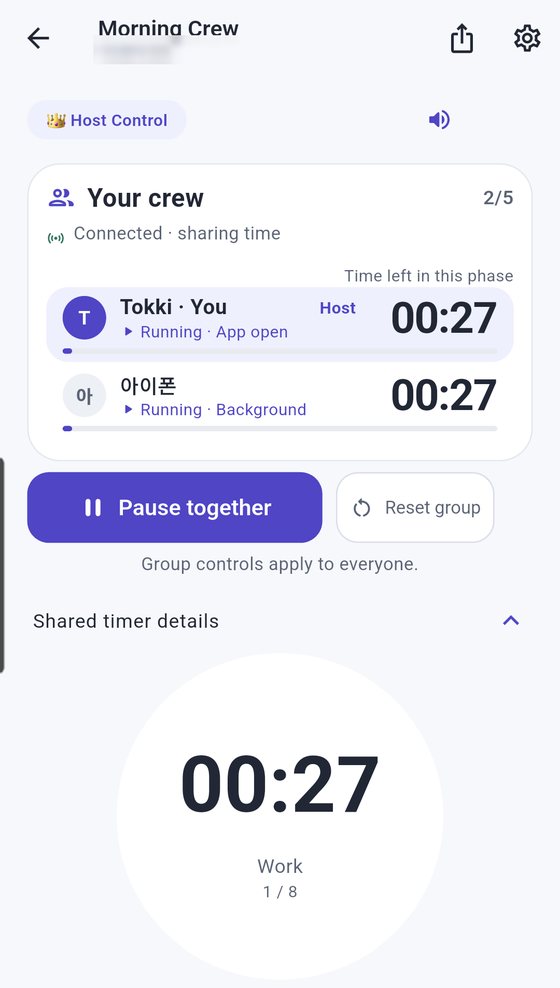
Interval timer room. The host and a crew member both show 00:27 left, Work phase, round 1 of 8
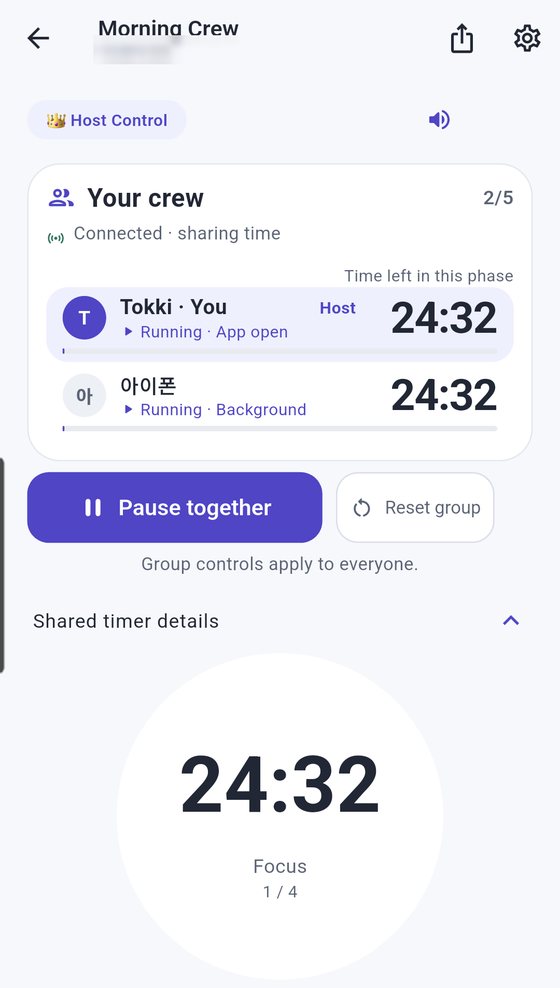
Pomodoro room. Two people share the same 24:32 focus time

Why Social Timer

"3, 2, 1, go!"
and somehow everyone's still off

When everyone taps their own phone timer, starts drift apart and someone always asks whether the break is over. Social Timer puts the clock in one room and shows everyone the same screen.

BeforeEveryone on their own timer

  • Everyone taps start at a slightly different moment, so you're out of sync from second one.
  • "Are we resting now?" Checking in with each other breaks the flow.
  • You can't see how much time others have left, so you end up waiting or rushing them.
  • Group apps make you sign up and add friends before you can do anything.

Social TimerOne room, one clock

  • The host taps "Start together" and the same countdown runs on every participant's screen.
  • Intervals switch between work and rest automatically, with an alert at each phase.
  • "Your crew" shows everyone's remaining time and status, live.
  • No sign-up, no phone number. One 8-character code gets you in.
⏱

In sync

Start at the same moment. When a countdown hits zero, everyone finishes at the same moment.

🔑

Effortless

Copy the 8-character code, or share it by QR, message, link or email. Nobody creates an account.

👀

At a glance

See who's running, who's paused, even who has the app open, all on one screen.

How it works

Up and running in no time

Follow along with real app screens. Create a room, send the code, tap "Start together". That's it.

PART 1Create a room
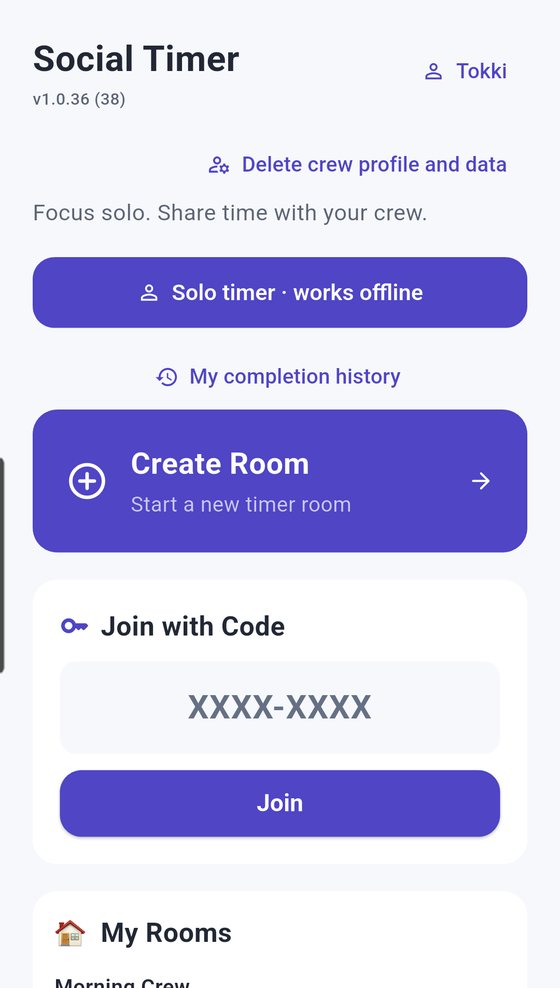
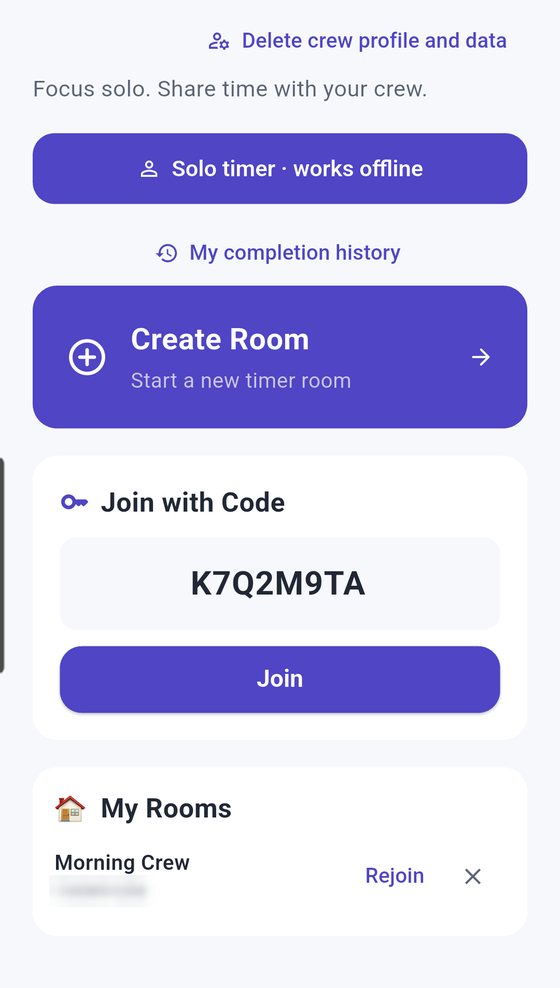
Social Timer home screen with Solo timer, My completion history, Create Room and Join with Code
1

Tap "Create Room" on the home screen

All you need is a nickname. No email, no phone verification, no password. Create a room, join one with a code, or start a solo timer, all from the home screen.

TIP You can wipe your crew profile and data any time with "Delete crew profile and data" on the home screen.

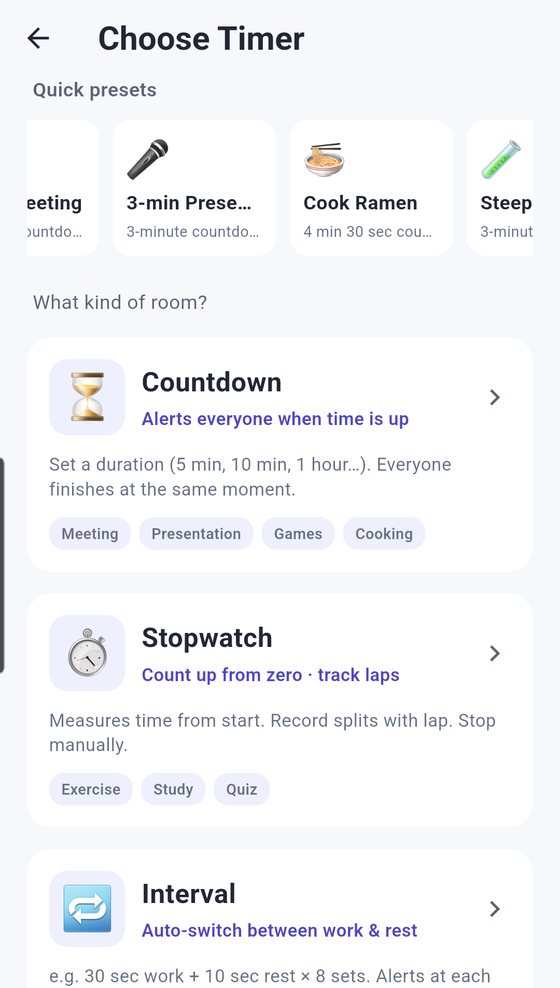
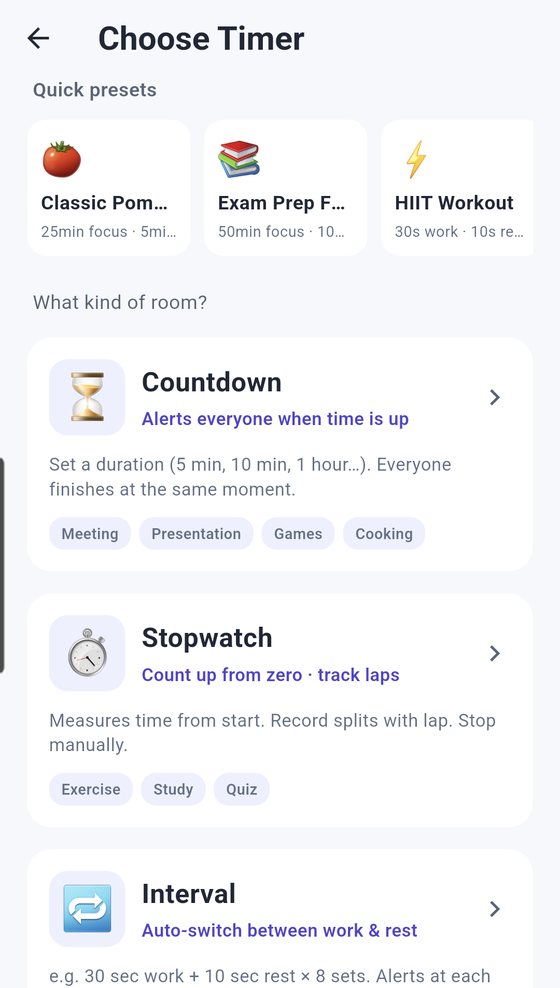
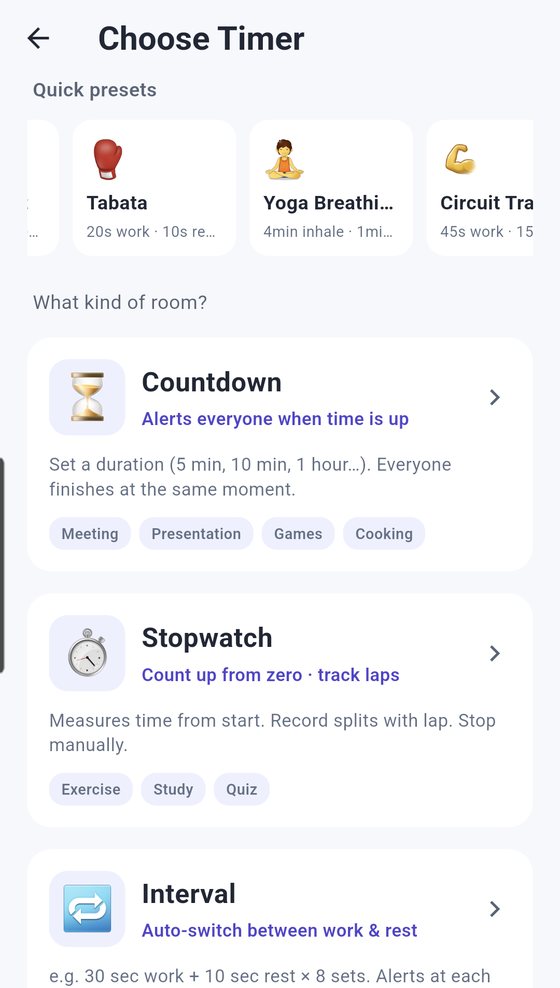
Choose Timer screen with quick presets (Classic Pomodoro, Exam Prep Focus, HIIT Workout) and the Countdown, Stopwatch and Interval types
2

Pick a quick preset, or choose a timer type yourself

Tap one of 13 scenario presets, like Tabata, HIIT Workout, Classic Pomodoro, Cook Ramen or Game Turn, and the room opens fully set up. Just give it a name. Prefer to build your own? Pick one of four timer types.

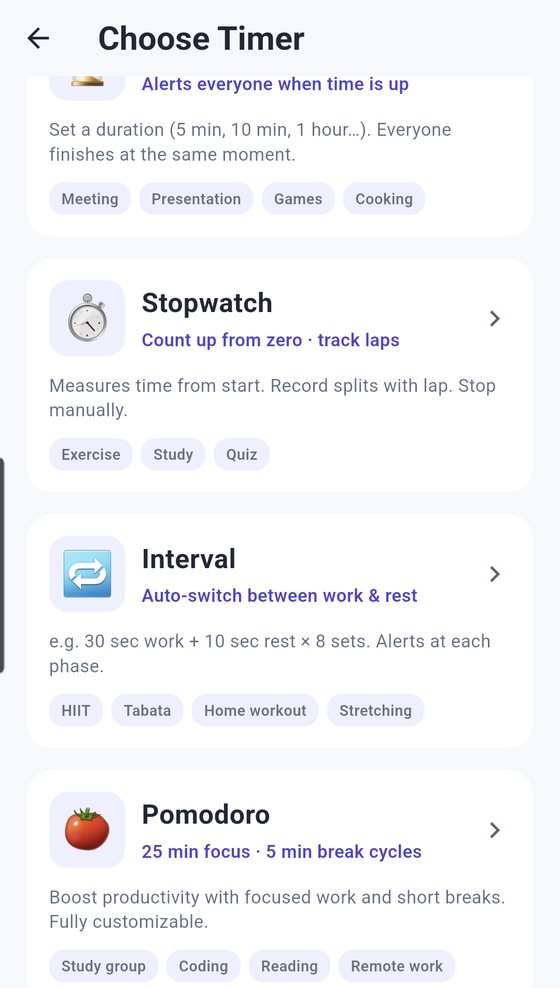
  • ⏳ CountdownAlerts everyone when time is up. Everyone finishes at the same moment.
  • ⏱️ StopwatchCounts up from zero. Record splits with lap.
  • 🔁 IntervalAuto-switches between work and rest, with an alert at each phase.
  • 🍅 PomodoroFocus and break cycles. Durations and cycles are fully adjustable.
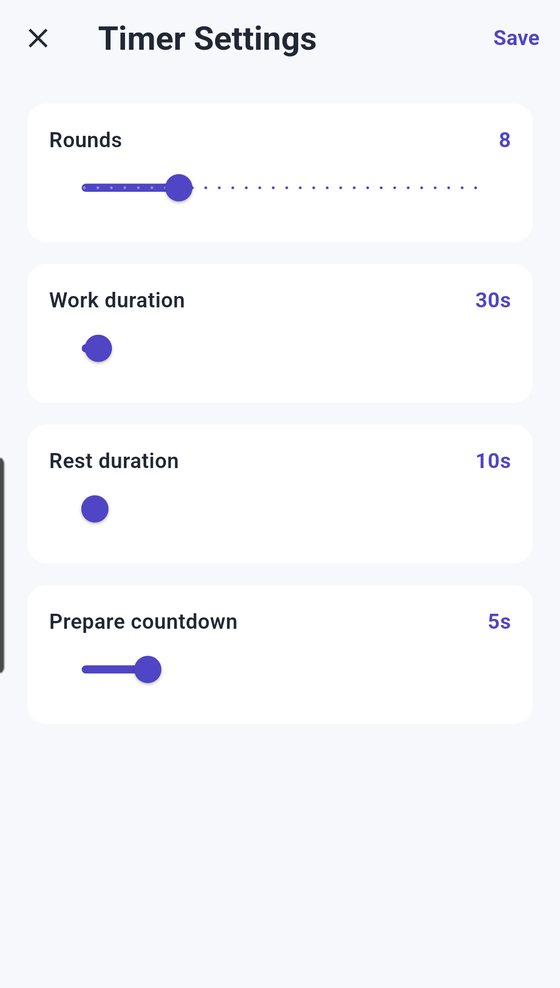
Interval timer settings: 8 rounds, 30s work, 10s rest, 5s prepare countdown
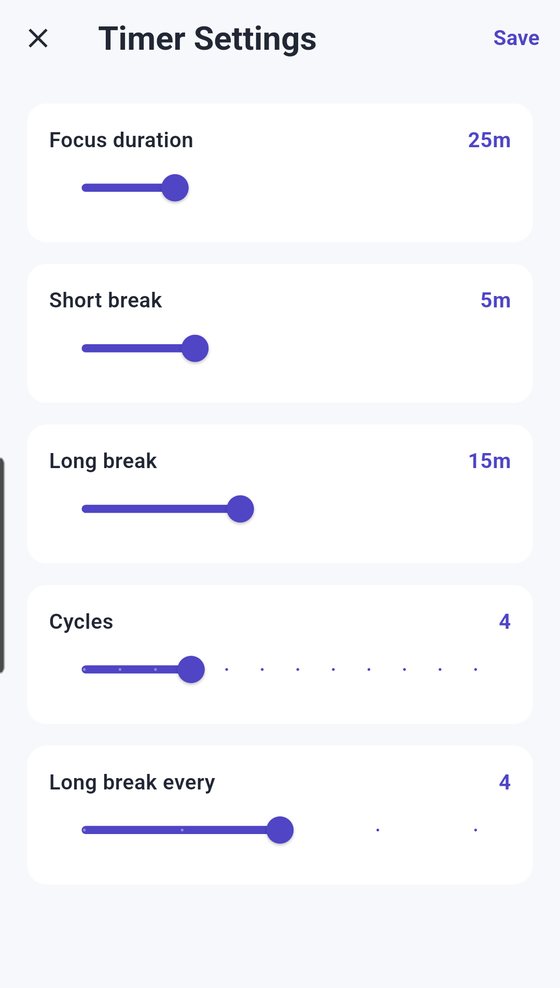
Pomodoro settings: 25m focus, 5m short break, 15m long break, 4 cycles
3

Dial in time and rounds with sliders

For intervals, set rounds, work time, rest time and a prepare countdown. For Pomodoro, set focus time, short break, long break, cycles and how often the long break comes around. Countdowns have quick picks for 1, 5, 10 and 25 minutes or 1 hour.

TIP You can change these any time after the room is created under Room Settings → Timer options.

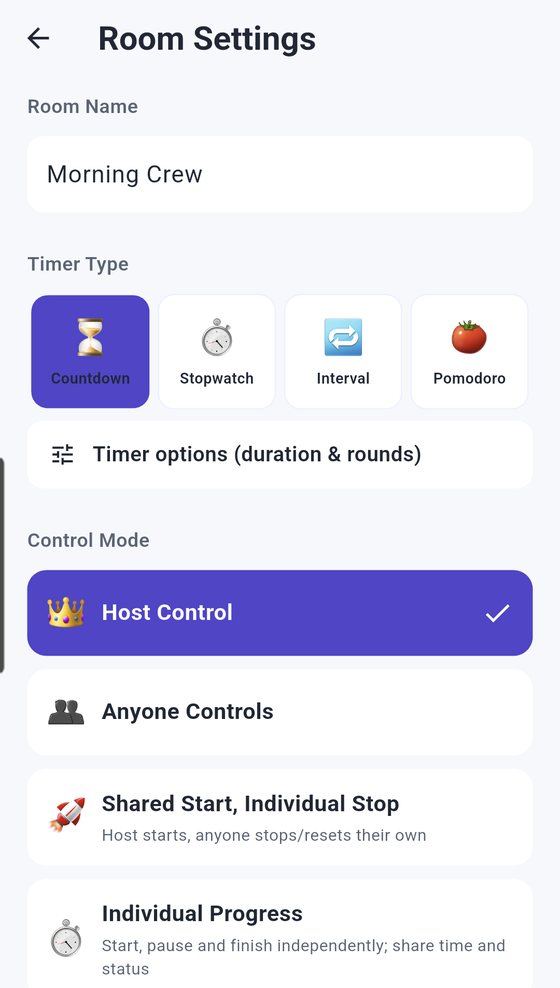
Room Settings showing the control modes: Host Control, Anyone Controls, Shared Start Individual Stop, Individual Progress
4

Decide who runs the clock

Pick the control mode that fits your group.

  • 👑 Host ControlOnly the host starts and stops, and it applies to the whole crew. Great for workouts and classes.
  • 👥 Anyone ControlsAnyone in the room can start or stop. Perfect for games where turns rotate.
  • 🚀 Shared Start, Individual StopThe host starts it; everyone stops or resets their own.
  • 📊 Individual ProgressEveryone starts, pauses and finishes on their own, while time and status stay shared.
PART 2Bring your crew
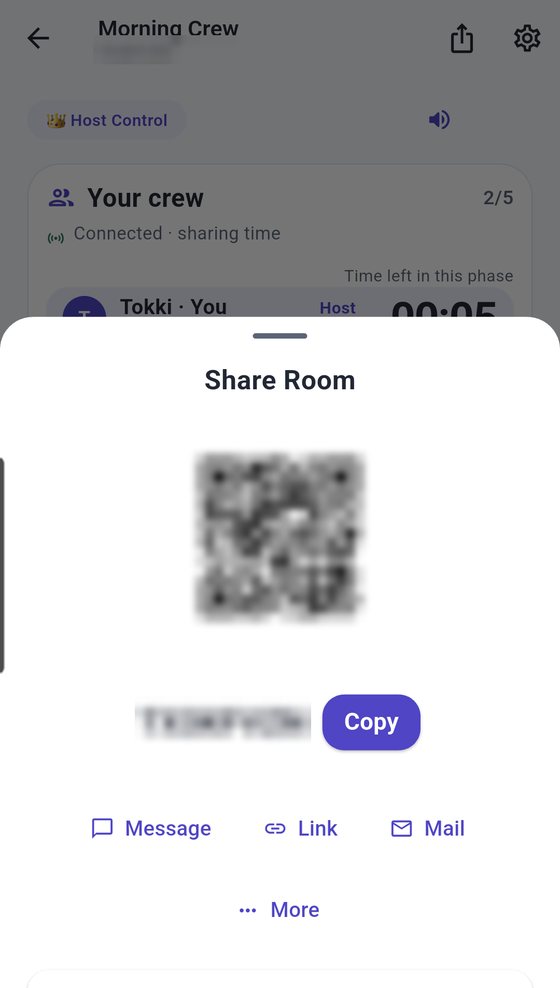
Share Room sheet with a QR code, the 8-character room code, a Copy button and Message, Link, Mail and More options (code blurred)
5

Send the 8-character code

Tap the share button at the top of the room to get the room code and a QR code. Copy the code into your group chat, or send it straight by message, link or email. If your friends are right there, just show them the QR.

TIP Turn on "Lock Room" to stop new people joining, or "Approval required" so only people you approve can get in.

Home screen with an 8-character code typed into Join with Code and the Join button
6

Your friends just type in the code

They open the app, enter the code under "Join with Code", tap Join, and they're in the same room. No sign-up screen, no friend requests. iPhone and Android users can share the same room.

PART 3Run it together
Interval running: both participants at 00:27, Work phase, round 1 of 8, with a Pause together button
7

One tap on "Start together" and every screen moves

The moment the host taps "Start together", the same count begins on every participant's screen. Intervals show the exact same phase and round for everyone, and pause and reset apply to the whole group at once.

TIP "Your crew" shows each person's remaining time, whether they're running or paused, and whether they have the app open, in real time.

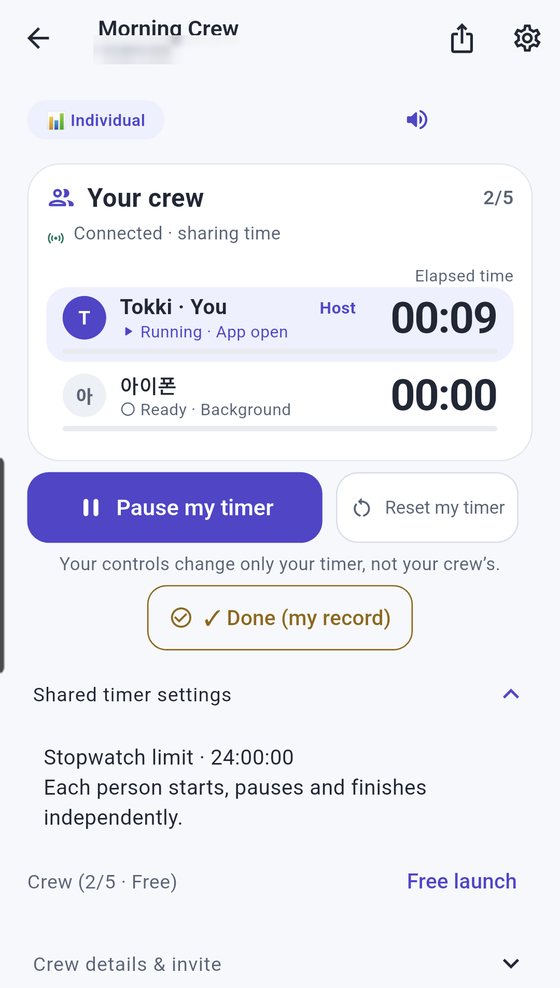
Stopwatch room in Individual mode: my timer running at 00:09 while the other member is still ready, with a Done (my record) button
8

Different pace? Use Individual Progress

In Individual Progress, your controls change only your timer, not your crew's. You still see everyone's elapsed time and status. Ideal when you study together but start at different times.

TIP Tap "Done (my record)" to save a completion record. Switching control modes resets everyone's timer to ready, and saved completion history is kept.

PART 4On your own
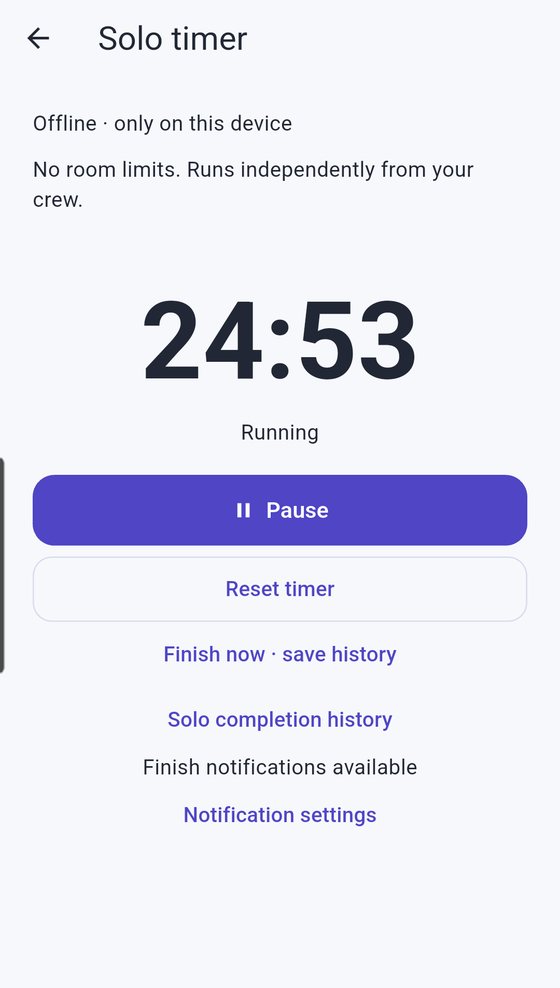
Solo timer: offline, only on this device, running at 24:53
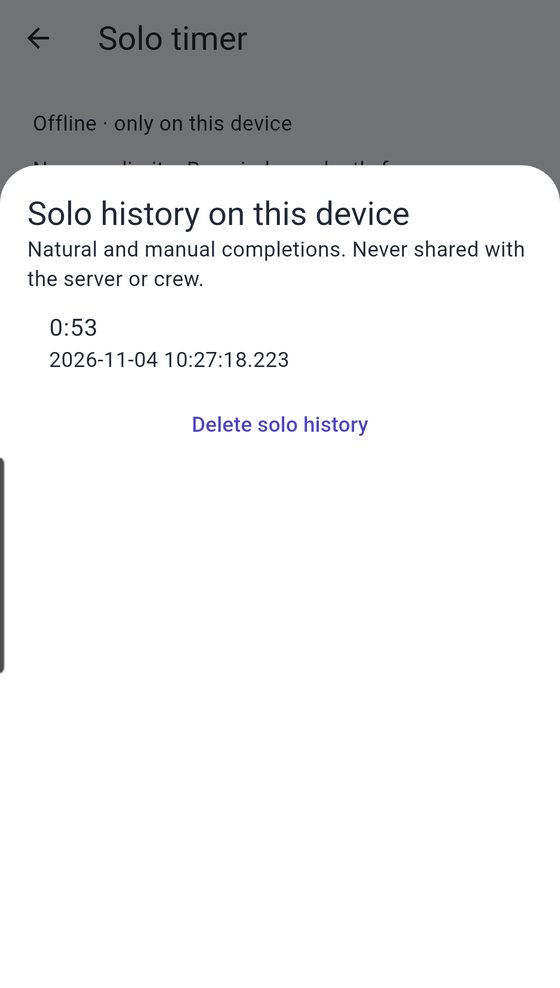
Solo history on this device with a saved completion time and date
9

Flying solo? Use the solo timer

The solo timer works offline, on this device only. It doesn't count against room limits and runs independently from your crew. Let it finish or tap "Finish now" and your completion is saved.

TIP Solo history stays on your device and is never shared with the server or your crew.

Example

How people use it

Which timer and control mode to pick for each situation. Every setting below is a real option in the app.

Quick presets: Tabata, Yoga Breathing, Circuit Training
Workout

Tabata and HIIT at the gym, everyone on the same count

Someone shouts "Go!", everyone watches their own phone, and rest periods end at different times.

The host starts it and 20 seconds of work, 10 seconds of rest flip over on every screen together. Everyone sees the same round, too.

TryIntervalHost Control"Tabata" or "HIIT Workout" preset
Pomodoro room with two people sharing 24:32 of focus time
Study

Study-group Pomodoro: focus together, break together

The second someone asks "is the break over?" in the group chat, focus is gone.

25 minutes of focus and 5 minutes of break run on the same beat for everyone. You take five together and get back to work together.

TryPomodoroHost Control"Classic Pomodoro" preset
Stopwatch room in Individual mode
Study

Study at your own pace, with your crew's time in view

When you study apart, it's hard to tell who's actually studying right now.

Everyone starts, pauses and finishes on their own, while the crew's elapsed time and status stay on one shared screen.

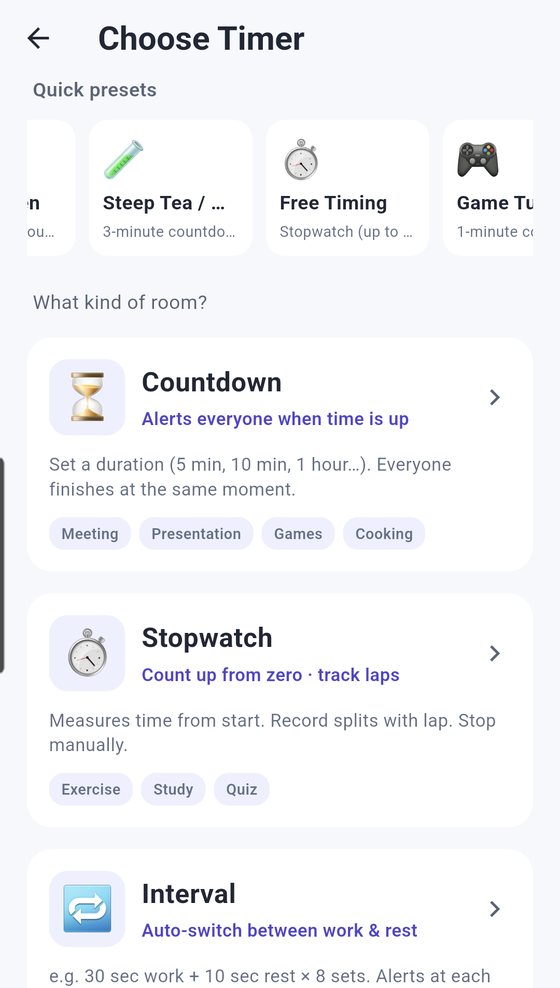
TryStopwatchIndividual Progress"Free Timing" preset
Quick presets: Steep Tea / Meds, Free Timing, Game Turn
Games

Board games and escape rooms: ditch the sand timer

Nobody can see the sand timer from across the table, and someone always has to be the timekeeper.

The same countdown shows up on every phone. With Anyone Controls, whoever's turn it is starts the clock.

TryCountdownAnyone Controls"Game Turn" preset
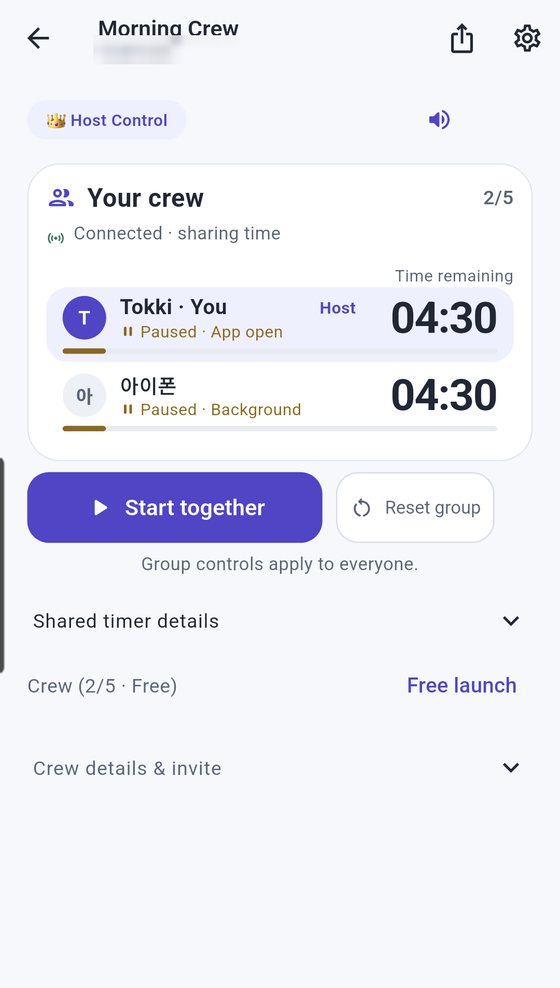
Countdown room in Host Control with both members ready at 04:30
Teachers & tutors

Small classes and tutoring: share test and task time precisely

You say "ten minutes left" and every student remembers it a little differently.

You start it and students see the same remaining time on their screens. At zero, everyone stops at the same moment.

TryCountdownHost Control
Quick presets: 3-min Presentation, Cook Ramen, Steep Tea
Meetings & cooking

5-minute meetings, 3-minute pitches, perfectly timed ramen

Only the timekeeper knows how long is left; everyone else is guessing.

Everyone watches the same countdown, so nobody has to ask "how much time do we have?"

TryCountdownHost Control"5-min Meeting" or "3-min Presentation" preset

These are usage examples written to explain the features, not reviews from real users. Rooms are currently free for up to 5 people, including the host.

Features

Everything you need to time things together

Simple to start, detailed when you need it. Here's what's in the app.

👥Your crew, live

See everyone's remaining time and progress in the same room, in real time: running, paused or ready, and whether the app is open or in the background.

⏳4 timer types

Countdown
Alerts everyone when time is up
Stopwatch
Counts up from zero, with laps
Interval
Auto-switches work and rest, alert at each phase
Pomodoro
Focus and break cycles, fully adjustable

🎛4 control modes

Host Control
The host's controls apply to the whole crew
Anyone Controls
Anyone can start and stop
Shared Start, Individual Stop
Host starts, everyone stops or resets their own
Individual Progress
Run your own timer, share time and status

⚡13 scenario presets

Tap one and the room opens ready to go.

🍅 Classic Pomodoro📚 Exam Prep Focus⚡ HIIT Workout🥊 Tabata🧘 Yoga Breathing💪 Circuit Training🏃 Running Intervals☕ 5-min Meeting🎤 3-min Presentation🍜 Cook Ramen🧪 Steep Tea / Meds⏱️ Free Timing🎮 Game Turn

🔑Join with an 8-character code

Copy the code or share it by QR, message, link or email. No sign-up, no phone number.

📴Solo timer

Works offline on your device and saves your completion history. Doesn't count against room limits.

🔒Room controls

Lock the room, require approval, manage members or dismiss the room, all from the host's settings.

Screens

A closer look at the app

Swipe to see more.

Free · Privacy

Nothing to sign up for

No accounts means there's a lot we simply never collect.

Free for up to 5Rooms of up to 5 people, host included, are free. Includes ads.
No sign-upWe don't collect your real name, email or phone number.
Auto-deleted after 90 daysRooms with no activity are deleted automatically after 90 days.
Delete any timeDelete your crew profile and data right from the app.

FAQ

Questions, answered

Do my friends need the app too?

Yes. Everyone who joins installs Social Timer and enters the 8-character code under "Join with Code" on the home screen. There's no sign-up step.

Do I need an account or phone verification?

No. Pick a nickname and you can create or join a room right away. We don't collect real names, emails or phone numbers.

Is it free?

Rooms of up to 5 people (host included) are free, with ads. According to the in-app notice, some features may become paid later, but dates and prices haven't been set and there are no automatic charges.

Can iPhone and Android users join the same room?

Yes. The App Store and Google Play apps join the same rooms with the same code.

Does it work without internet?

The solo timer works offline, on your device only. Rooms where several people share time need an internet connection.

How many people can join a room?

Currently up to 5 people, including the host, for free.

Can I change the timer type or control mode after creating a room?

Yes. Room Settings lets you change the timer type, durations and rounds, and the control mode. Changing the control mode resets everyone's current timer to ready; saved completion history is kept.

When do rooms and data go away?

Rooms with no activity are deleted automatically after 90 days. The host can dismiss a room at any time, and anyone can delete their crew profile and data in the app.

Social Timer app icon

Make your next set
a shared one

Create a room, send the code, done. No sign-up, and free for rooms of up to 5.